Database Course
Ahmad Yoosofan
SQL 3
University of Kashan
Update(I)
update P
set weight = null
where pn='P6';
update s
set status = status * 2
where city = 'London';
update employees
set email = LOWER(
    firstname || "." || lastname || "@chinookcorp.com"
);
update employees
set lastname = 'Smith'
where employeeid = 3;
Update(II)
update tableA
set B = 'abcd',
  C = case
    when C = 'abc' then 'abcd'
    else C
  end
where column = 1;

-- https://stackoverflow.com/a/17081004/886607
update s
set
  status = case
    when city = 'london' then status * 2
    else status
  end
update s
set
  status = case
  when city = 'London' then status * 2
  when city = 'Paris'  then status * 3
  else status
end
update s
set
  status = case
    when city = 'London' then status / 4
    when city = 'Paris'  then status / 3
    else status
  end
Condition on delete
  delete from sp
  where qty < (
      select avg(qty)
      from sp
    )
  ;
1 select sum(weight) as sq
2 from p where pn='p7';
1 select case
2   when sum(weight) is null then 0
3   else sum(weight)
4 end as sq
5 from p
6 where pn='p7';
sq |
|---|
|
sq |
|---|
0 |
 1 update student S
 2 set tot_cred = (
 3   select sum(credits)
 4   from takes, course
 5   where takes.course_id = course.course_id
 6     and S.ID= takes.ID and
 7     takes.grade <> 'F' and
 8     takes.grade is not null
 9 );
1 case
2   when sum(credits) is not null
3     then sum(credits)
4   else 0
5 end
 1 update student S
 2 set tot_cred = (
 3   select case
 4     when sum(credits) is not
 5       null then sum(credits)
 6     else 0
 7   end
 8   from takes, course
 9   where takes.course_id = course.course_id
10     and S.ID= takes.ID and
11     takes.grade <> 'F' and
12     takes.grade is not null
13 );
with(I)
select pn, pname
from p, (
    select avg(weight) as averagev
    from p
  ) as temp
where p.weight > temp.averagev
;
select pn, pname
from p
where p.weight > (
    select avg(weight)
    from p
  )
;
with temp (averagev) as(
  select avg(weight)
  from p
)
select pn, pname
from p, temp
where p.weight > averagev
;
with(II)
select pn
from (
    select avg(weight) as averagev
    from p
  ) as temp1, (
    select pn, sum(qty) as total
    from sp
    group by pn
  ) as temp2
where temp2.total > temp1.averagev
;
with temp1(averagev) as(
    select avg(weight)
    from p
  ),
  temp2(pn, total) as(
    select pn, sum(qty)
    from sp
    group by pn
  )
select pn
from temp1, temp2
where temp2.total > temp1.averagev
;
with(III)
with dept_total (dept_name, value) as(
    select dept_name, sum(salary)
    from instructor
    group by dept_name
  ),
  dept_total_avg(value) as(
    select avg(value)
    from dept_total
  )
select dept_name
from dept_total, dept_total_avg
where dept_total.value > dept_total_avg.value
With Diagram
Unknown
- 3 = 2 => FALSE
- 3 = 3 => TRUE
- NULL = 3 => UNKNOWN
- 3 = NULL => UNKNOWN
- NULL = NULL => UNKNOWN
- NULL <> 1 => UNKNOWN
- NULL > 1 => UNKNOWN
select * -- always empty
from p
where weight = null
;

select *
from p
where weight is null
;

select *
from p
where weight > 13 or city = 'Paris'
;
expression IS TRUE
expression IS NOT TRUE
expression IS FALSE
expression IS NOT FALSE
expression IS UNKNOWN
expression IS NOT UNKNOWN
Three-valued logic
- Boolean logic
- Kleene and Priest logics
(F: false; U: unknown; T: true)
A | ~A |
|---|---|
F | T |
T | F |
U | U |
A and B | B | |||
|---|---|---|---|---|
T | F | U | ||
A | T | T | F | U |
F | F | F | F | |
U | U | F | U | |
A or B | B | |||
|---|---|---|---|---|
T | F | U | ||
A | T | T | T | T |
F | T | F | U | |
U | T | U | U | |
1 select *
2 from List_of_tables
3 where (conditions) is unknown;
1 select *
2 from List_of_tables
3 where (conditions) is not unknown;
1 select *
2 from List_of_tables
3 where not ( (conditions) is not unknown);
1 select *
2 from List_of_tables
3 where ( (conditions) is not unknown) is not unknown;
Always True
"is not unknown" , "is unknown"
- Always True or False
- It cannot be "unknown"
- The meaning of "null" and "unknown" is different
- The usages of "null" and "unknown" is different
The final result of an uknown condition is False
نام قطعاتی را بیابید که وزن بیشتر از ۱۷ دارند.
1 select pname
2 from p
3 where weight > 17;
نام قطعاتی را بیابید که وزن آنها بیشتر از ۱۸ است و عرضهکنندهای در شهر پاریس آنها را عرضه کرده است.
1 select pname
2 from p join sp using(pn) join s using(sn)
3 where weight >= 18 and p.city = 'Paris';
1 select pname
2 from p join sp using(pn) and s using(sn)
3 where weight is not null
4   and weight >= 18 and p.city = 'Paris';
نام قطعاتی را بیابید که وزن آنها بیشتر از ۱۸ است یا وزنی ندارند و عرضهکنندهای در شهر پاریس آنها را عرضه کرده است.
1 select pname
2 from p join sp using(pn) and s using(sn)
3 where (weight is null or weight > 18)
4   and s.city = 'Paris';
نام قطعاتی را بیابید که وزن آنها بیشتر از ۱۸ است یا وزنی ندارند و عرضهکنندهای در شهر پاریس آنها را عرضه کرده است ولی اگر شهر عرضه کننده وارد نشده باشد وزن آن بیشتر از ۳۴ باشد.
1 select pname -- incorrect
2 from p
3 where weight > 17;
select n, d
from t
where n / nullif(d, 0) > 1
; -- returns the first value,
-- unless it's equal to the second
-- in which case it returns NULL.
-- It is equivalent to this CASE statement:
-- CASE WHEN A <> B OR B IS NULL THEN A END
-- The NULLIF() function returns NULL
-- if two expressions are equal, otherwise
-- it returns the first expression.
SELECT(
  SUM (CASE WHEN gender = 1 THEN 1 ELSE 0 END) /
    SUM (CASE WHEN gender = 2 THEN 1 ELSE 0 END)
) * 100 AS "Male/Female ratio"
FROM members;


-- ERROR:  division by zero
-- The reason is that the number of females is zero now.
-- To prevent this division by zero error, you can use
-- the NULLIF function as follows:

 SELECT (
     SUM (CASE WHEN gender = 1 THEN 1 ELSE 0 END) /
       NULLIF (
        SUM (CASE WHEN gender = 2 THEN 1 ELSE 0 END),
        0
     )
   ) * 100 AS "Male/Female ratio"
 FROM members;
SELECT product, (price - COALESCE(discount, 0)) AS net_price
FROM items;
SELECT product, (
price - CASE WHEN discount IS NULL THEN 0 ELSE discount END
  ) AS net_price
FROM items;
SELECT CASE i WHEN NULL THEN 'Is Null'  -- This will never be returned
  WHEN    0 THEN 'Is Zero'  -- This will be returned when i = 0
  WHEN    1 THEN 'Is One'   -- This will be returned when i = 1
  ELSE  'Other'
  END
FROM t;
نام همهٔ قطعات را همراه با جمع عرضههای آنها بیابید در صورتی که وزن قطعه بیشتر از ۲۰ باشد یا این که وزنی نداشته باشد برای این قطعهها جمع عرضه در نظر گرفته شود وگرنه مانند قطعههای عرضه نشده، جمع عرضههای آنها صفر در نظر گرفته شود.
1 select pname
2 from p join sp using(pn) join s using(sn)
3 where weight > 17 and ;
نام قطعاتی را بیابید که وزن آنها بیشتر از ۱۸ باشد و عرضهکنندهای با وضعیت بیشتر از ۲۰ آنها را عرضه کرده باشد.
1 select pname
2 from p join sp using(pn) join s using(sn)
3 where weight > 17 and s.status >20;
Only Conditions with Known Values
Pr : is a large combinations of conditions
1 ((pr) is not unknown) and pr ;
1 select *
2 from List_of_tables
3 where (conditions) is not unknown;
Check
CREATE TABLE t (
  a NUMERIC CHECK (a >= 0),
  b NUMERIC CHECK (b >= 0),
  CHECK ( a + b <= 10 )
);
 1 create database sp2;
 2
 3 create table s (
 4   sn      char(10) primary key,
 5   sname   char(30) not null,
 6   status  int default 10  check(status >= 10),
 7   city    char(20) default 'Shiraz'
 8 );
 9
10 create table p (
11   pn     char(10) primary key,
12   pname  char(30) not null,
13   color  char(20),
14   weight numeric(9, 2) check(weight > 2 and weight < 90000),
15   city   char(20)
16 );
17
18 create table sp (
19    sn    char(10) references s on update cascade on delete cascade,
20    pn    char(10) references p on update cascade on delete cascade,
21    qty   int default 1 check(qty > 0),
22    primary key (sn, pn)
23 );
Foreign Key Error
 1 create table "Department"(
 2   "DN" integer default 0 primary key,
 3   "DeptName" varchar(30) default '',
 4   "MgrSSN" varchar(20) REFERENCES "Employee"("SSN")
 5 );
 6 create table "Employee"(
 7   "SSN" varchar(20) primary key,
 8   "name" varchar(40) not null,
 9   "salary" numeric(15,2) default 0,
10   "Dn" integer default 0 REFERENCES "Department"("DN")
11 );
12
13 insert into "Department"("DN", "DeptName", "MgrSSN")
14     values(1, 'computer', '');
15 insert into "Department"("DN", "DeptName", "MgrSSN")
16     values(2, 'Chemistry', '');
-- SQLite
Result: FOREIGN KEY constraint failed
At line 14:
insert into "Department"("DN", "DeptName", "MgrSSN")
    values(1, 'computer', '');
Foreign Key Error(PostgreSQL)
1 create table "Department"(
2   "DN" integer default 0 primary key,
3   "DeptName" varchar(30) default '',
4   "MgrSSN" varchar(20) REFERENCES "Employee"("SSN")
5 );
ERROR: relation "Employee" does not exist
1 create table "Employee"(
2   "SSN" varchar(20) primary key,
3   "name" varchar(40) not null,
4   "salary" numeric(15,2) default 0,
5   "Dn" integer default 0 REFERENCES "Department"("DN")
6 );
ERROR: relation "Department" does not exist
 1 create table "Department"(
 2   "DN" integer default 0 primary key,
 3   "DeptName" varchar(30) default '',
 4   "MgrSSN" varchar(20)
 5 );
 6
 7 create table "Employee"(
 8   "SSN" varchar(20) primary key,
 9   "name" varchar(40) not null,
10   "salary" numeric(15,2) default 0,
11   "Dn" integer default 0
12 );
 1 insert into "Department"("DN", "DeptName", "MgrSSN")
 2   values(1, 'computer', '');
 3 insert into "Department"("DN", "DeptName", "MgrSSN")
 4   values(2, 'Chemistry', '');
 5
 6 insert into "Employee"("SSN", "name", "salary", "Dn")
 7   values('e2', 'kamran', 1200, 1);
 8
 9 insert into "Employee"("SSN", "name", "salary", "Dn")
10   values('e10', 'ali', 1200, 2);
 1 update "Department" set "MgrSSN"='e2' where "DN"=1;
 2 update "Department" set "MgrSSN"='e10' where "DN"=2;
 3
 4 alter table "Department" add constraint "departmentManager" foreign key("MgrSSN")
 5   references "Employee"("SSN") on update cascade on delete no action;
 6
 7 update "Employee" set "Dn"=1 where "SSN"='e2';
 8 update "Employee" set "Dn"=2 where "SSN"='e10';
 9
10 alter table "Employee" add constraint "employeeDepartment" foreign key("Dn")
11   references "Department"("DN") on update cascade on delete no action;
12 -- set default
13 -- set null
SQLite is incomplete
create table tte1(
  myid integer default 0 primary key,
  salary numeric(14,2) check(salary >= 100),
  name1 varchar(20) not null,
  dept2 integer references "Department"("DN"),
  fee   numeric(14, 2) default 10, --check(salary - fee > 80)
  check(salary - fee > 80)
);

insert into tte1(myid, salary, name1, dept2, fee)
  values(31, 1200, 'هوشنگ', 1, 200);
Result: FOREIGN KEY constraint failed
At line 10:
insert into tte1(myid, salary, name1, dept2, fee)
    values(31, 1200, 'هوشنگ', 1, 200);
Same Sample in PostgreSQL
create table tte1(
  myid integer default 0 primary key,
  salary numeric(14,2) check(salary >= 100),
  name1 varchar(20) not null,
  dept2 integer references "Department"("DN"),
  fee   numeric(14, 2) default 10, --check(salary - fee > 80)
  check(salary - fee > 80)
);

insert into tte1(myid, salary, name1, dept2, fee)
  values(31, 1200, 'هوشنگ', 1, 200);
INSERT 0 1
create table "Department"(
  "DN" integer default 0 primary key,
  "DeptName" varchar(30) default '',
  "MgrSSN" varchar(20)
);

create table "Employee"(
  "SSN" varchar(20) primary key,
  "name" varchar(40) not null,
  "salary" numeric(15,2) default 0,
  "Dn" integer default 0
);
insert into "Department"("DN", "DeptName", "MgrSSN")
  values(1, 'computer', '');
insert into "Department"("DN", "DeptName", "MgrSSN")
  values(2, 'Chemistry', '32');

alter table "Department" add constraint "departmentManager" foreign key("MgrSSN")
  references "Employee"("SSN") on update cascade on delete no action;
ERROR:  insert or update on table "Department" violates foreign key constraint "departmentManager"
DETAIL:  Key (MgrSSN)=(32) is not present in table "Employee".
no action, restrict, set null, set default or cascade
- no action
- restrict
- set null
- set default
- cascade
Constraint(I)
- Primary key
- not null (No field part of primary key can be null)
- foreign keys
- unique
pragma foreign_keys
pragma foreign_keys=off;

pragma foreign_keys=on;

pragma foreign_keys=off;
insert into "spj"("sn", "pn", "jn", "qty") values('S7', 'P1', 'J1', 123);
delete from "SPJ" where "sn" = 'S7';
pragma foreign_keys=on;
insert into "spj"("sn", "pn", "jn", "qty") values('S7', 'P1', 'J1', 123);
Error:
  Help: foreign key constraint failed
SQLite uses the following terminology
- The parent table is the table that a foreign key constraint refers to.
- The child table is the table that a foreign key constraint is applied to and the table that contains the references clause.
- The parent key is the column or set of columns in the parent table that the foreign key constraint refers to.
- The child key is the column or set of columns in the child table
Alter table Foreign key
MySQL / SQL Server / Oracle / MS Access
alter table Orders
add constraint FK_PersonOrder
foreign key (PersonID) references Persons(PersonID);
All
نام قطعاتی را بیابید که وزن آن قطعهها از وزن همهٔ قطعههای درون شهر پاریس بیشتر باشد
select T.pname
from p as T
where not exists(
    select *
    from p
    where city = 'Paris' and
      p.weight >= T.weight
);
select pname
from p
where weight > all(
    select weight
    from p
    where city='Paris'
  )
;
Some
نام قطعاتی را بیابید که وزن آن قطعهها از دست کم وزن یک قطعه درون شهر پاریس بیشتر باشد
select T.pname
from p as T
where exists(
    select *
    from p
    where city = 'Paris' and
      T.weight > p.weight
  )
;
select pname
from p
where weight > some (
    select weight
    from p
    where city = 'Paris'
  )
;
IN
نام قطعاتی را بیابید که عرضهکنندهای همشهری آن قطعهها باشد
select pname
from p
where city in (
    select city
    from s
  )
;
کوشش کنید با exists این پرسوجو را حل کنید.
select pname
from p
where exists (
    select *
    from s
    where p.city = s.city
  )
;
نام قطعاتی را بیابید که هیچ عرضهکنندهای در شهر آن قطعات نباشد
select pname
from p
where city not in (
    select city
    from s
  )
;
کوشش کنید با exists این پرسوجو را حل کنید.
select pname
from p
where not exists (
    select *
    from s
    where p.city = s.city
  )
;
نام قطعاتی را بیابید که هیچ عرضه کنندهٔ همشهریشان آنها را عرضه نکرده باشد.
select pname
from p
where city, pn not in (
    select city, pn
    from s natural join sp
  )
;
کوشش کنید با exists این پرسوجو را حل کنید.
select pname
from p
where not exists(
    select *
    from s natural join sp
    where s.city = p.city
      and sp.pn = p.pn
  )
;
نام قطعاتی را بیابید که هیچ عرضه کنندهٔ همشهریشان هیچ قطعهای را عرضه نکرده باشد.
نام قطعاتی را بیابید که عرضه کنندهای در شهرشان نباشد که قطعهای عرضه کرده باشد.
select pname
from p
where city not in (
    select city
    from s natural join sp
  )
;
کوشش کنید با exists این پرسوجو را حل کنید.
select pname
from p
where not exist(
    select *
    from s natural join sp
    where s.city = p.city
  )
;
نام قطعاتی را بیابید که هیچ عرضه کنندهٔ همشهریشان هیچ قطعهای را عرضه نکرده باشد.
select pname  from p
where city not in (
    select city
    from s
    where sn not in
    (select sn from sp)
  );
select pname from p
where city in (
    select city
    from s
    where sn not in
    (select sn from sp)
  );
select pname from p
where city not in (
    select city from s
    where sn in
    (select sn from sp)
  );
نام قطعاتی را بیابید که وزن آنها از قطعهای در شهر کاشان بزرگتر باشد.
select pname
from p
where weight > some (
    select weight
    from p
    where city = 'Kashan'
  )
;
select pname
from p as T
where exist(
    select *
    from p
    where p.city = 'Kashan'
      and T.weight > p.weight
  )
;
شمارهٔ قطعاتی را بیابید که در شهر آنها عرضه کنندهای با وضعیت بزرگتر از ۶ وجود داشته باشد.
select pn
from p
where city in (
    select city
    from s
    where status > 6
  );
select pn
from p
where city = some(
    select city
    from s
    where status > 6
  );
select pn
from p
where city = ( -- Error
    select city
    from s
    where status > 6
  );
select city
from s
where status > 6;
-- result has more
-- than a row
select pn
from p join s using(city)
where status > 6;
order by
نام و وضعیت عرضه کنندگان را به صورت صعودی بر پایهٔ وضعیت آنها بیابید.
select sname, status
from s
order by status ;
select sname, status
from s
order by status asc;
sname | status |
|---|---|
Jones | 10 |
Smith | 20 |
Clark | 20 |
Blake | 30 |
Adams | 30 |
Ali | 40 |
order by ..... desc
نام و وضعیت عرضه کنندگان را به صورت نزولی بر پایهٔ وضعیت آنها بیابید.
select sname, status
from s
order by status desc;
sname | status |
|---|---|
sname | status |
Ali | 40 |
Blake | 30 |
Adams | 30 |
Smith | 20 |
Clark | 20 |
Jones | 10 |
create table mytemp(
  name varchar(20) not null,
  ssn  bigint primary key
  );

insert into mytemp(ssn) values(20);
--- Help: not null constraint failed: mytemp.name
alter table mytemp add last_name varchar(20);

insert into mytemp(ssn, name) values(20, "ali");
select *
from mytemp;
شمارهٔ عرضهکنندگانی را بیابید که جمع وزن قطعههایی که عرضه میکنند بیشتر از ۱۱ هزار باشد
select sn
from spj join p using(pn)
group by sn
having sum(weight * qty) > 11000;
select sn
from s
where 11000 < ( select sum(weight * qty)
             from p natural join spj
             where spj.sn = s.sn
           );
شماره و نام عرضه کنندگان را بیابید. اگر وضعیت عرضهکننده بزرگتر از ۲۰ بود کنار مشخصات عرضه کننده کلمهٔ big و در غیر این صورت کلمهٔ small بگذارید.
select sn, sname, case
    when status > 20 then 'big'
    else 'small'
    end size_of_supplier
from s;
select pn
from p
where city = (
    select city
    from s
    where status>6
);
select pn
from p
where city in (
    select city
    from s
    where status>6
);
select pn,
   (select sum(status)
    from s
    where s.city=p.city
   ),
   city
from p
order by weight desc;
select pn,
   (select sum(status)
    from s
    where s.city=p.city
   ) as sum_status,
   city
from p
order by weight desc ;
Unique(I)
CREATE TABLE Persons (
    ID int NOT NULL UNIQUE,
    LastName varchar(255) NOT NULL,
    FirstName varchar(255),
    Age int
);
CREATE TABLE Persons (
    ID int NOT NULL,
    LastName varchar(255) NOT NULL,
    FirstName varchar(255),
    Age int,
    UNIQUE (ID)
);
CREATE TABLE Persons (
    ID int NOT NULL,
    LastName varchar(255) NOT NULL,
    FirstName varchar(255),
    Age int,
    CONSTRAINT UC_Person UNIQUE (ID,LastName)
);
create table "student"(
  "SSN" varchar(20) unique not null,
  "name" varchar(40) not null,
  "student_number" bigint Primary key
  );

insert into
  "student"("SSN", "name", "student_number")
values
("38947389", "کامران خداپرستی", 973433),
("38472389", "کوروش پارسایی", 9632847),
("38947389", ")احمد یوسفان", 93802932);
Unique(II)
create table contacts(
    contact_id integer primary key,
    first_name text,
    last_name text,
    email text not null UNIQUE
);
create table shapes(
  shape_id integer primary key,
  background_color text,
  foreground_color text,
  UNIQUE(background_color,foreground_color)
);
ALTER TABLE Persons
ADD UNIQUE (ID);
ALTER TABLE Persons
ADD CONSTRAINT UC_Person
  UNIQUE (ID,LastName);
ALTER TABLE Persons
DROP CONSTRAINT UC_Person;
Unique(III)
create table contacts (
  contact_id integer primary key,
  first_name text    not null,
  last_name  text    not null,
  email      text,
  phone      text    not null
    check (length(phone) >= 10)
);
create table products (
  product_id   integer         primary key,
  product_name text            not null,
  list_price   DECIMAL (10, 2) not null,
  discount     DECIMAL (10, 2) not null
                              default 0,
  check (list_price >= discount and
      discount >= 0 and
      list_price >= 0)
);
Unique condition
select pn
from p
where unique(
  select *
  from sp
  where sp.pn = p.pn
)
;
-- not implemented in PostgreSQL
select pn
from p
where not unique(
  select *
  from sp
  where sp.pn = p.pn
)
;
-- not implemented in PostgreSQL
نام شهرهایی را به دست آورید که عرضه کنندهای با وضعیت بیشتر از ۱۰۰۰ داشته باشند
select distinct city
from   s
where exists
     ( select * from s as T
       where T.city=s.city and T.status>1000
     )
select distinct city
from   s
where s.status>1000
نام شهرهایی را به دست آورید که همهٔ عرضه کنندگان آن شهرها وضعیت بیشتر از ۱۰۰۰ داشته باشند
select distinct city
from   s
where not exists
     ( select * from s as T
       where T.city=s.city and T.status<1000
     );
select city
from   s
except
select city
from   s
where s.status<=1000
ENUM TYPE
create type Type_of_Menu as enum ('soft_menu', 'vertical_menu', 'horizontal_menu',
    'reports', 'report_with_submenu', 'report_in_submenu'
);

create table menu_access(
  menu_type Type_of_Menu,
  name char(256),
  visible boolean,
  primary key (menu_type, name)
)
Check constraint
create type valid_colors as enum ('red', 'green', 'blue');

create table t (
    color VALID_COLORS
);
The following does not work
select from t where color like 'bl%';
create table t (
    colors text check (colors in ('red', 'green', 'blue'))
);
lateral
select pn, sn, p.city, t.city
from p, LATERAL (select sn, s.city from s where s.city = p.city) as t;
select pn, sn, p.city, t.city -- Error
from p, (select sn, s.city from s where s.city = p.city) as t;
Error invalid reference to FROM-clause entry for table "p"
LINE 2: ... from p, (select sn, s.city from s where s.city = p.city) as...
                                                             ^
HINT: There is an entry for table "p", but it cannot be referenced
from this part of the query.
select pn, sn, p.city, s.city
from p, s
where s.city = p.city;
select pn, sn, p.city, s.city
from p natural join s;
with psk as (select city from p natural join s)
  select * from psk;

with psk as (select city, weight, pn, sn from p natural join s)
  select * from psk
  where weight < (select avg(weight) from p);

with psk as (select city, weight, pn, sn from p natural join s)
  , jsk as (select city, sn, jn, status from s NATURAL join j)
  select psk.city, psk.weight, psk.sn, psk.pn, jsk.jn from psk, jsk
  where weight < (select avg(weight) from p) and
    jsk.city = psk.city;
-- Error
select psk.city, psk.weight, psk.sn, psk.pn, jsk.jn
from (select city, weight, pn, sn from p natural join s) as psk
  , (select city, sn, jn, status from s NATURAL join j) as jsk
where weight < (select avg(weight) from psk) and
  jsk.city = psk.city;
Vacuum
vacuum;

vacuum full;
auto_vaccum
pragma auto_vacuum = full;
pragma auto_vacuum = incremental;
pragma auto_vacuum = none;
vacuum with an into clause
View
create view kashan_p as(
  select *
  from p
  where city = 'Kashan'
);
Sample View
create table student
  (ID     varchar(5),
   name     varchar(20) not null,
   dept_name    varchar(20),
   tot_cred   numeric(3,0) check (tot_cred >= 0),
   primary key (ID),
   foreign key (dept_name)
    references department (dept_name)
    on delete set null
  );
update student S
set tot_cred = (
  select sum(credits)
  from takes, course
  where takes.course_id = course.course_id
    and S.ID= takes.ID and
    takes.grade <> 'F' and
    takes.grade is not null
);
create table student
  (ID     varchar(5),
   name     varchar(20) not null,
   dept_name    varchar(20),
   primary key (ID),
   foreign key (dept_name)
    references department (dept_name)
    on delete set null
  );
create view student_total as (
  select ID, name, dept_name, (
      select sum(credits)
      from takes, course
      where takes.course_id = course.course_id
        and student.ID= takes.ID and
        takes.grade <> 'F' and
        takes.grade is not null
  ) as total_cred
  from student
);
ALTER VIEW kashan_p RENAME TO kashan_parts;
DROP VIEW [ IF EXISTS ] kashan_parts;
drop view if exists m2;
drop view if exists m1;

create view m1 as
  select sn, city
  from s
  where status > 8
  ;

create view m2 as
  select sn, pn
  from m1 natural join p
  ;
view
- select is fine
- insert, update, delete is problematic
- unless it depends only on one table almost
- Speed of execution
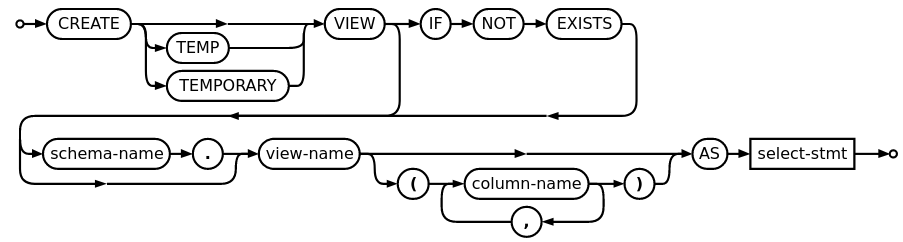
CREATE [ OR REPLACE ] [ TEMP | TEMPORARY ] [ RECURSIVE ] VIEW name [ ( column_name [, ...] ) ]
    [ WITH ( view_option_name [= view_option_value] [, ... ] ) ]
    AS query
    [ WITH [ CASCADED | LOCAL ] CHECK OPTION ]
CREATE VIEW employee_department_info AS
SELECT e.employee_id, e.first_name, e.last_name, d.department_name
FROM employees e
JOIN departments d ON e.department_id = d.department_id;
MATERIALIZED VIEW
CREATE MATERIALIZED VIEW table_name
    [ (column_name [, ...] ) ]
    [ WITH ( storage_parameter [= value] [, ... ] ) ]
    [ TABLESPACE tablespace_name ]
    AS query
    [ WITH [ NO ] DATA ]
ALTER MATERIALIZED VIEW [ IF EXISTS ] name
    action [, ... ]
ALTER MATERIALIZED VIEW [ IF EXISTS ] name
    RENAME [ COLUMN ] column_name TO new_column_name
ALTER MATERIALIZED VIEW [ IF EXISTS ] name
    RENAME TO new_name
ALTER MATERIALIZED VIEW [ IF EXISTS ] name
    SET SCHEMA new_schema

where action is one of:

    ALTER [ COLUMN ] column_name SET STATISTICS integer
    ALTER [ COLUMN ] column_name SET ( attribute_option = value [, ... ] )
    ALTER [ COLUMN ] column_name RESET ( attribute_option [, ... ] )
    ALTER [ COLUMN ] column_name SET STORAGE { PLAIN | EXTERNAL | EXTENDED | MAIN }
    CLUSTER ON index_name
    SET WITHOUT CLUSTER
    SET ( storage_parameter = value [, ... ] )
    RESET ( storage_parameter [, ... ] )
    OWNER TO new_owner
    SET TABLESPACE new_tablespace
create materialized view "pscity" ("sn", "pn", "city") AS
    select "sn", "pn", "p"."city"
    from "s" join "p" on "s"."city" = "p"."city";

drop materialized view "pscity";
REFRESH MATERIALIZED VIEW name
  [ WITH [ NO ] DATA ]

REFRESH MATERIALIZED VIEW order_summary;

REFRESH MATERIALIZED VIEW annual_statistics_basis WITH NO DATA;
create materialized view student_total as (
  select ID, name, dept_name, (
      select sum(credits)
      from takes, course
      where takes.course_id = course.course_id
        and student.ID= takes.ID and
        takes.grade <> 'F' and
        takes.grade is not null
  ) as total_cred
  from student
);
REFRESH MATERIALIZED VIEW student_total;
Recursive query
create table course
  (course_id    varchar(8),
   title      varchar(50),
   dept_name    varchar(20),
   credits    numeric(2,0)
     check (credits > 0),
   primary key (course_id),
   foreign key (dept_name)
     references department
     (dept_name)
     on delete set null
  );
create table prereq
  (course_id    varchar(8),
   prereq_id    varchar(8),
   primary key (course_id, prereq_id),
   foreign key (course_id) references course (course_id)
    on delete cascade,
   foreign key (prereq_id) references course (course_id)
  );
.
with recursive rec_prereq(course_id, prereq_id) as (
      select course_id, prereq_id
      from prereq
    union
      select rec_prereq.course_id, prereq.prereq_id,
      from rec_rereq, prereq
      where rec_prereq.prereq_id = prereq.course_id
    )
  select ∗
  from rec_prereq;
General Recursive Form
with recursive r(c1, c2, ...) as (
    -- Non-recursive term.
    (
      select ...
    )

    union [all]

    -- Recursive term. Notice the
    -- so-called recursive
    -- self-reference to r.
    (
      select ... from r ...
    )
  )
select ... from r ...;
with recursive r(n) as (
-- Non-recursive term.
    (
      values(1)
    )
    union all
    -- Recursive term.
    (
      select n + 1
      from r
      where n < 5
    )
  )
select n from r order by n;

-- n 1 2 3 4 5
Maximum one recursive CTE (Common Table Expression)
with a1(n) as (select 42),
  a2(n) as (
    with recursive r(n) as (
        values(1)
        union all
        select n + 1
        from r
        where n < 5
    )
    select n from r
  ), a3(n) as (select 99)(
    select n from a1
    union all
    select n from a2
    union all
    select n from a3
  )
  order by n desc;

--- n,  99  42  5  4  3  2  1
END